Tracking AI SEO with the Moose Stack: Introducing llm-eieio
I’ve been talking to a few friends at Fiveonefour about how developers discover tools and how it’s changing. The answer isn’t StackOverflow anymore, I don’t think the answer is Google anymore. It’s “hey Claude, what’s a good stack for real-time analytics?” or “how would I build customer-facing dashboards with live data?” And when the answer comes back from an LLM, complete with code examples and perceived sentiment around the project you’re more likely to use it. But how do you know if your tool is showing up in LLM responses?
I built llm-eieio to find out. Yes, there are commercial options, but I wanted to use this as an excuse to explore the MooseStack by Fiveonefour.
The name is a riff on AIEO (AI Engine Optimization, the emerging discipline of making sure your product shows up favorably in AI-generated responses). AIEO sounds a little too much like a certain children’s song to pass up, so here we are.
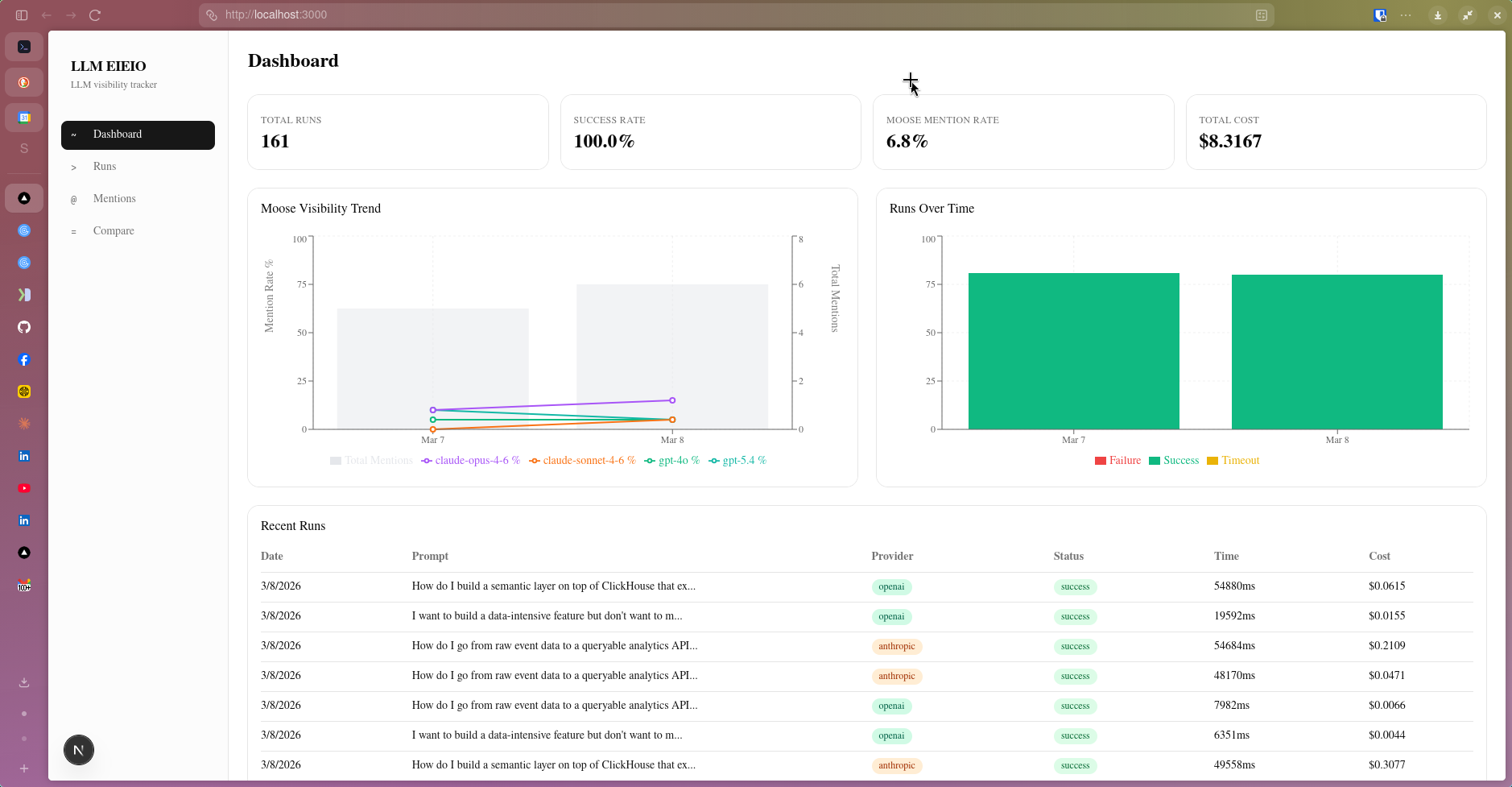
What It Does
The concept is straightforward. You configure a set of prompts, the kinds of questions a developer might actually ask an AI assistant when evaluating tools. It runs each prompt across multiple LLM providers and models, captures the responses, and analyzes them for mentions of your target entity. The target entity is configurable (set TARGET_ENTITY in your .env and the entire dashboard reorients around it).
For the initial Moose tracking, I wrote 20 prompts designed to cover a spectrum from oblique to direct. The oblique ones ask broad ecosystem questions like “what’s a good stack for real-time analytics?” without naming Moose at all. Moderate prompts describe the problem Moose solves without mentioning it. Direct prompts ask specifically about the product category. And a single targeted prompt names Moose explicitly, “What is the MooseStack?”
Moose only appeared in responses to the most direct prompt and nowhere else. That’s a 5% prompt mention rate. The goal is to push it higher, and the dashboard tracks that metric over time so you can actually see whether content, docs, and community efforts move the needle.
The Runs Explorer is where this all becomes concrete. Every individual LLM call is logged (prompt, provider, model, status, response time, token count, and cost) and surfaced in a filterable table.
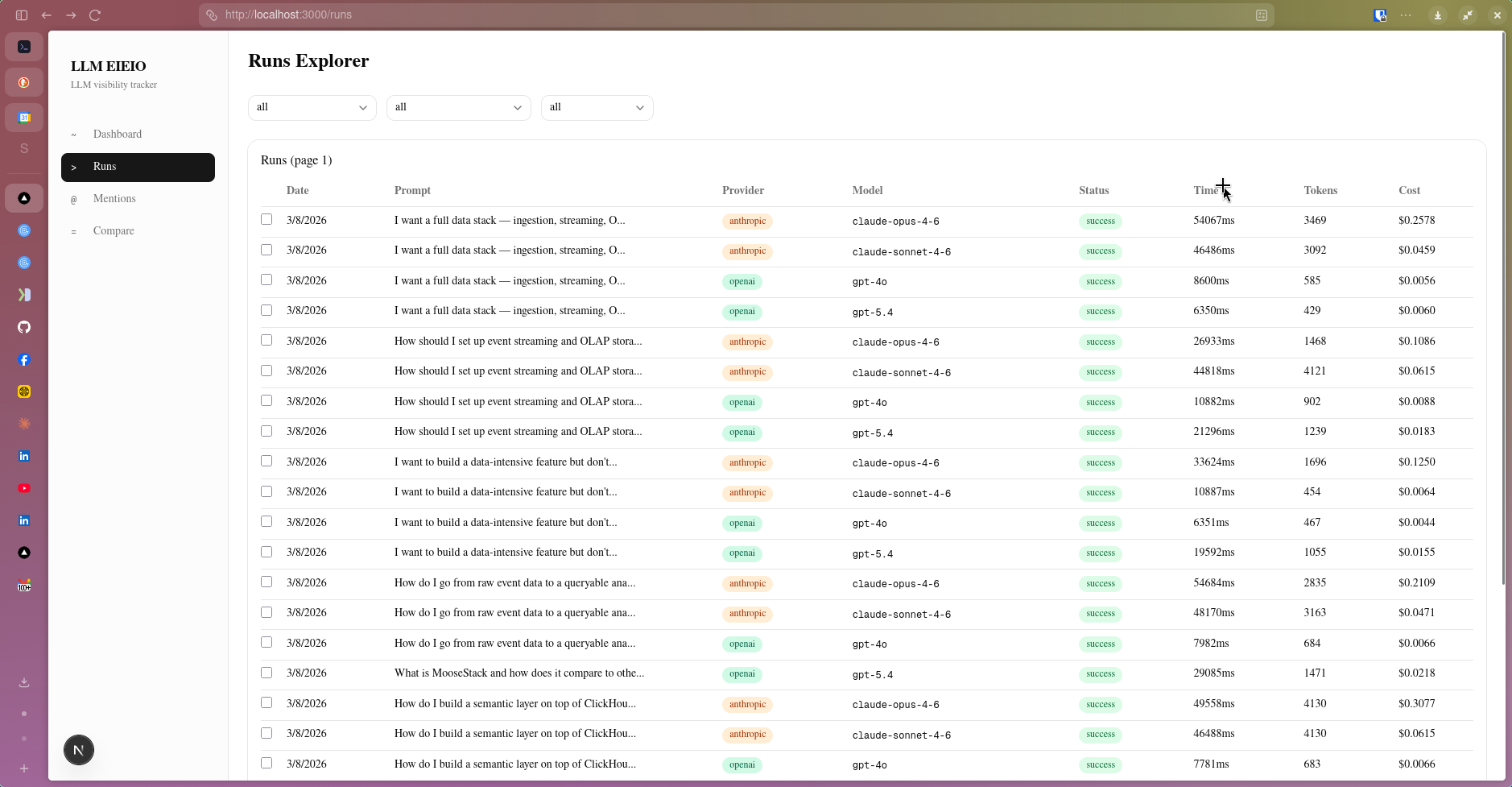 The Runs Explorer logs every LLM call. Here, a handful of prompts have been run across Claude Opus 4.6, Claude Sonnet 4.6, GPT-4o, GPT-5.4, and Gemini 2.0 Flash — each row is a distinct run that can be inspected individually.
Drilling into any run opens the Run Detail view, which shows the full response the model returned alongside the prompt metadata (provider, model, token counts, cost, and response time).
 A run detail for claude-sonnet-4-6 responding to “How should I set up event streaming and OLAP storage for my TypeScript application?” The response is rendered inline, with highlighted entity mentions visible directly in the text.
Below the LLM’s raw response, llm-eieio extracts and structures every entity the model mentioned: tool name, entity type, sentiment, whether it was actively recommended, and the surrounding context snippet. The extraction is performed by Anthropic’s Haiku model by default and entities are compared against a known list to keep them as clean and organized as possible. Ideally Moose, MooseStack, and moose stack all end up grouped together.
 The extracted entities table for a single run. TypeScript, Kafka, Redpanda, ClickHouse, DuckDB, AWS, Kinesis, Druid, Node.js, and Zod are all identified, typed, scored for sentiment, and flagged as recommended — along with the context that triggered each mention.
That structured extraction is what makes the aggregate views meaningful.
The Ecosystem Map
Across all runs, the Entity Mentions page rolls up the co-occurrence data into something actionable.
 The Entity Mentions view. The top chart shows mention frequency trends over time for the top 5 entities. The rankings table below shows all 216 entity mentions captured, with columns for total mentions, average position in responses, recommended rate, and which providers surfaced each entity.
The rankings table tells a clear story about how AI systems currently model the real-time analytics ecosystem. ClickHouse leads with 137 mentions and an 87% recommended rate. Kafka follows at 94 mentions and 67%. TypeScript, Node.js, BigQuery, PostgreSQL, AWS, dbt, and Redpanda round out the top 9, all surfaced across Anthropic, OpenAI, and Google models.
This is the map of how AI understands the space. If you’re trying to establish positioning in an ecosystem like this, that map matters. A lot.
Comparing Models Side by Side
One of the more useful views is Compare Runs, which lets you select two runs side-by-side and see how different models responded to the same prompt.
 Two runs of the same prompt compared side by side. Both used claude-sonnet-4-6, but on different executions — the responses differ meaningfully in structure and entity emphasis, illustrating that LLM responses aren’t deterministic even within a single model.
I find this view useful for spotting where models diverge: which tools they recommend, what architecture patterns they favor, and where the responses converge on consensus. It’s also a practical way to evaluate whether a prompt is well-formed. If responses are wildly inconsistent across runs of the same model, the prompt itself probably needs work. You can compare across models, across dates, etc. Each comparison trying to answer a different question.
Why the Moose Stack
I built llm-eieio on the MooseStack, FiveOneFour’s open-source framework for real-time data-intensive applications. The data shape of this problem maps cleanly to what Moose was designed for.
Each LLM query run produces an event (prompt, provider, model, raw response, extracted entities, mention flag, timestamp). Run that across many prompts, providers, and models on a recurring schedule, and you have a continuous stream of analytical events that need fast ingestion, durable storage, and responsive querying.
But the biggest seller with the Moosestack is how much you get for free. Define your data models and the ingest API, streaming layer, and Clickhouse tables are all configured in one go. There’s simply no faster way to get started with a user facing data oriented application than using Moose!
Redpanda for Ingestion
Rather than writing query results directly to a database, runs flow through a Redpanda topic first. This decouples the LLM query execution from the storage layer, so events can be replayed, inspected, or rerouted without touching application logic. For a tool designed to run continuously on a schedule, resilience in the ingestion layer is worth the investment, especially if we started to run this against larger prompt counts, for multiple targets, etc.
ClickHouse for Storage and Queries
The results land in ClickHouse, where the aggregation queries that power the dashboard run. The performance on analytical aggregations (mention rates grouped by provider, model, prompt, and time window) is the reason the dashboard feels fast. I don’t need to pre-materialize anything; the queries are quick enough to run fresh on demand, which keeps the data model simple and the dashboard flexible.
Temporal for Orchestration
Running LLM queries across multiple providers and models is a fan-out problem with real failure surface area: rate limits, timeouts, provider outages. Temporal handles the orchestration, scheduling runs, managing retries, and isolating failures at the individual model level. If one provider is down mid-run, the rest complete cleanly.
Next.js Frontend
The dashboard is a Next.js application querying ClickHouse via Moose’s consumption APIs. The fast query response means there’s no need for aggressive caching — results are fresh on every load.
The Data Model
The core of the app is two event types: the run itself, and the entities extracted from each response.
// Moose data models (simplified)
export interface PromptRun {
  runId: Key<string>;
  timestamp: Date;
  promptId: string;
  promptText: string;
  providerId: string;
  modelId: string;
  status: string;
  rawResponse: string;
  responseTimeMs: number;
  inputTokens: number;
  outputTokens: number;
  estimatedCostUsd: number;
}

export interface ParsedMention {
  runId: string;
  timestamp: Date;
  promptId: string;
  providerId: string;
  modelId: string;
  entityName: string;
  entityType: string;
  position: number;
  recommended: boolean;
  sentiment: string;   // "positive" | "neutral" | "negative"
  context: string;     // surrounding snippet
}
Defining these schemas in Moose is the starting point for everything. The Redpanda ingestion topics, the ClickHouse tables, and the streaming pipelines all derive from them. I spend my time thinking about the shape of the data, not the plumbing. That’s the Moose way.
Try It Yourself
llm-eieio is open source. You can point it at any tool or technology you want to track. It’s not specific to Moose or any particular ecosystem.
git clone https://github.com/wrathagom/llm-eieio
cd llm-eieio
npm install

cp .env.example .env
# Add your API keys to .env (Anthropic, OpenAI, and/or Google)
Prompts are configured in prompts/core.json. Each prompt has a directness level (oblique, moderate, direct, or targeted) so you can measure how explicitly you need to ask before your product shows up.
{
  "promptId": "realtime-analytics-stack",
  "text": "What's a good stack for real-time analytics?",
  "category": "stack-selection",
  "directness": "oblique"
}
Start the Moose backend and the dashboard:
npx moose dev          # starts ClickHouse, Redpanda, Temporal, and the API server
cd ui && npm install && npm run dev   # starts the dashboard at localhost:3000
What I Didn’t Expect
The entity co-occurrence data ends up being the most surprisingly useful output. The mention rate for your target tool is the headline metric, but the ecosystem map that emerges from watching what gets mentioned alongside it is where the real competitive intelligence lives. You start to see how AI models understand the landscape, which tools they group together, which ones they pit against each other.
For any developer tool operating in a space where AI-generated recommendations are becoming a primary discovery surface, that map is worth having. And the Moose Stack (Redpanda, ClickHouse, Temporal) turns out to be a natural fit for collecting it.
If you’re curious about how AI sees your product, give it a try. I’d love to hear what you find.